Introduction
Creating quality video content takes time, planning, and resources. But a business video does not have to be used only once. With the right strategy, you can repurpose business videos for social media and turn one piece of content into multiple useful posts for different platforms.
Instead of creating a completely new video for every social media post, businesses can extract valuable sections from existing footage and transform them into short-form videos, educational clips, promotional content, customer-focused posts, and more.
This approach can help businesses save production time, maintain a consistent publishing schedule, and get more value from videos they have already created.
Whether you have product demonstrations, customer testimonials, tutorials, interviews, webinars, or promotional videos, learning how to repurpose them can strengthen your social media content strategy.
What Does Video Repurposing Mean?
Video repurposing is the process of taking existing video content and adapting it into different formats or smaller pieces for use across multiple channels.
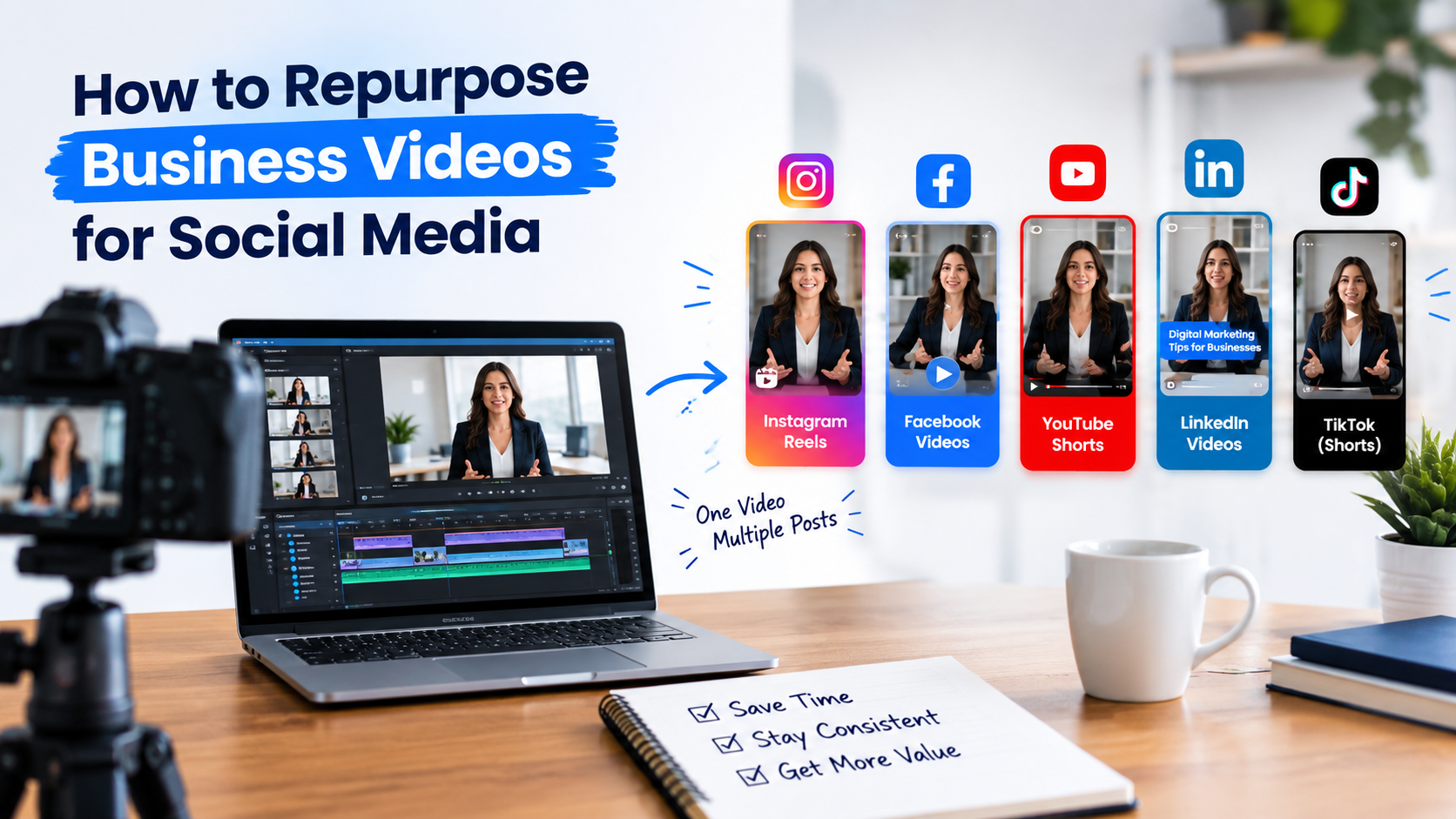
For example, a 10-minute business video could become:
Instagram Reels
Facebook video clips
YouTube Shorts
LinkedIn educational videos
Short promotional clips
FAQ videos
Quote graphics
Educational social media posts
Website content
The purpose is not simply to upload the exact same video everywhere. Effective repurposing means adapting the content, format, length, messaging, and call to action for the platform and audience.
Why Should Businesses Repurpose Video Content?
Creating fresh videos continuously can be difficult, particularly for small businesses with limited time and marketing resources. Video repurposing allows businesses to make better use of content they already have.
Save Time and Production Resources
Creating a new video requires planning, recording, editing, reviewing, and publishing. Repurposing existing footage can reduce the amount of work needed to create additional social media content.
A single long-form video may contain several useful ideas that can be turned into individual short videos.
Maintain a Consistent Social Media Presence
Consistent publishing helps businesses stay visible to their audiences. Instead of struggling to find a completely new topic for every post, marketers can build several pieces of content from an existing video.
This makes it easier to maintain a social media content calendar without constantly starting from scratch.
Reach Audiences Across Different Platforms
People consume content differently depending on the platform.
Someone may prefer a quick educational Reel, while another viewer may want a detailed explanation on YouTube or LinkedIn.
When you repurpose business videos for social media, you can adapt the same core message to different content formats and audiences.
Extend the Lifespan of Existing Content
A professionally produced business video represents an investment of time and money. Publishing it once limits the number of opportunities people have to discover it.
Repurposing allows useful information from the original video to remain relevant across multiple posts and publishing dates.
Which Business Videos Are Best for Repurposing?
Not every video needs to be repurposed in the same way. Start with videos that contain useful, evergreen, or audience-focused information.
Good candidates include:
Product demonstrations
Service explanations
Customer testimonials
Tutorials
Interviews
Webinars
Frequently asked questions
Educational presentations
Behind-the-scenes videos
Case studies
Promotional videos
A strong candidate usually contains several independent ideas, questions, tips, or statements that can work as standalone content.
How to Repurpose Business Videos for Social Media
The process becomes easier when you use a consistent workflow. Instead of randomly cutting videos into clips, identify the most valuable parts and build content around them.
1. Choose a Strong Original Video
Start by reviewing your existing video library.
Choose a video that is relevant to your target audience and contains information that can be divided into smaller topics.
For example, a video titled “Complete Guide to Digital Marketing for Small Businesses” could contain several sections about SEO, Google Ads, social media, website conversions, and lead generation.
Each section could potentially become its own piece of content.
2. Identify Key Moments
Watch the original video and mark sections that provide a clear answer, useful tip, strong opinion, interesting insight, or practical solution.
Avoid selecting clips simply because they are short. A good repurposed clip should communicate a complete idea.
For example:
Original video:
“Complete Guide to Digital Marketing for Small Businesses”
Potential clips:
“3 Digital Marketing Mistakes Small Businesses Make”
“How to Generate More Website Leads”
“Why Your Business Needs Google Ads”
“One Simple Way to Improve Your Social Media Content”
“How Website Visitors Become Customers”
This gives you several focused topics from one original video.
3. Turn Long Videos Into Short-Form Content
Short-form videos are a practical way to repurpose business videos for social media.
Take valuable sections from longer videos and edit them into concise clips. Remove unnecessary pauses and irrelevant sections, then add captions or supporting on-screen text where appropriate.
You do not need to force every long video into the same number of clips. Some videos may provide two strong clips, while others may provide five or more.
The priority should always be useful content rather than producing a large number of weak posts.
4. Adapt the Video for Each Platform
A repurposed video should not necessarily look identical on every platform.
Consider the platform, audience, video format, opening hook, captions, and CTA before publishing.
Instagram is suitable for short, visually engaging content such as:
Reels
Quick tips
Product demonstrations
Educational clips
Behind-the-scenes videos
Keep the main idea easy to understand and make the opening seconds relevant to the viewer.
Facebook can be useful for:
Educational videos
Customer-focused content
Product demonstrations
Promotional clips
Short business tips
A short introduction can provide context before the video begins.
LinkedIn is particularly useful for professional and B2B content.
Business videos can be repurposed into:
Industry insights
Expert tips
Case-study clips
Interviews
Educational content
Business advice
Focus on providing useful information rather than making every video purely promotional.
YouTube Shorts
Long-form YouTube content can also be turned into Shorts. YouTube currently provides tools that allow creators to extract segments from existing videos and create Shorts from them.
For example, a long tutorial can provide several short clips, each answering a specific question.
YouTube Help: Create Shorts from existing videos.
5. Add Captions and On-Screen Text
Captions can make business video content easier to follow, particularly for viewers who watch without sound.
Depending on the content, you can add:
Captions
Key phrases
Short headings
Important statistics
Product or service names
Calls to action
Keep text readable and avoid covering important visual elements.
The purpose of on-screen text is to support the message, not overwhelm the viewer.
6. Create Multiple Content Types From One Video
Repurposing does not have to mean creating only short videos.
A single customer testimonial, for example, could become:
Short video:
A 20–30 second testimonial clip.
Quote graphic:
A strong sentence from the customer.
Social media caption:
A short summary of the customer's experience.
Website content:
A customer success story.
FAQ video:
A clip explaining the problem the customer needed to solve.
This approach turns one video into a broader content asset rather than a single social media post.
Example: Turn One Video Into a Content Series
Imagine a roofing company records a 10-minute video explaining roof maintenance.
That one video could be repurposed into:
“3 Signs Your Roof Needs Attention”
“Why Roof Maintenance Matters”
“How to Spot Early Roof Damage”
“Common Roof Maintenance Mistakes”
“When Should You Schedule a Roof Inspection?”
The original video remains the primary source, while each shorter piece focuses on one specific question or topic.
This is one of the simplest ways to create a structured social media video content series.
7. Add Branding and a Clear CTA
Every repurposed video should remain recognizable as part of your brand.
Depending on your style, you may include:
Logo
Brand fonts
Consistent visual elements
Website address
Social media handle
Relevant CTA
The CTA should match the purpose of the video.
For example:
“Visit our website to learn more.”
“Contact us for a consultation.”
“Read the full guide on our website.”
“Follow us for more business tips.”
Avoid adding several competing calls to action to the same short video.
8. Organize Repurposed Content With a Content Calendar
Once you have multiple clips, avoid publishing everything at once.
Instead, organize them into a content calendar.
For example:
Day | Content |
Monday | Educational short video |
Wednesday | Quick tip |
Friday | Promotional clip |
Next Monday | FAQ video |
Next Wednesday | Customer-focused clip |
The exact schedule should depend on the business, audience, and platform. The important point is to spread related content over time.
Common Video Repurposing Mistakes to Avoid
Repurposing can save time, but poor execution can make content feel repetitive or low quality.
Posting the Exact Same Video Everywhere
Uploading the identical video to every platform may not provide the best experience.
Adjust the format, opening, caption, CTA, and presentation according to the platform.
Cutting Clips Without a Complete Message
A short clip should still make sense on its own.
If a clip starts in the middle of an explanation and viewers do not understand the context, they may stop watching.
Making Every Clip Promotional
Not every video needs to directly sell a service.
Educational tips, answers, demonstrations, and useful insights can help businesses provide value while building familiarity with their brand.
Using Weak Openings
Short-form content needs a clear reason for viewers to continue watching.
Instead of beginning every clip with a long introduction, start with the question, problem, insight, or benefit that matters to the audience.
Adding Too Much Text
Captions and on-screen text are useful, but excessive text can make a video difficult to watch.
Keep important information short, readable, and properly positioned.
Ignoring Copyright and Usage Rights
If you add music, stock footage, graphics, or third-party material to a repurposed video, make sure you have the appropriate rights to use it.
For example, YouTube notes that creators should ensure copyright-protected material used in Shorts is authorized for their use.
How Many Pieces of Content Can One Video Produce?
There is no fixed number.
A long-form video with several useful sections may produce multiple short clips, while a shorter video may only provide one or two strong pieces of content.
The goal should not be to maximize the number of posts. The goal is to identify useful, distinct content that can serve different audience needs.
Quality and relevance should guide the repurposing process.
A Simple Video Repurposing Workflow
You can use this workflow for almost any business video:
Step 1: Choose a useful existing video.
Step 2: Identify the strongest sections.
Step 3: Separate each complete idea into a potential clip.
Step 4: Edit clips for the intended platform.
Step 5: Add captions and supporting text.
Step 6: Apply consistent branding.
Step 7: Add one clear CTA where appropriate.
Step 8: Schedule the content across your social media calendar.
Step 9: Review performance and identify which topics deserve additional content.
This process makes it easier to consistently repurpose business videos for social media without creating every piece of content from the beginning.
Get More Value From Your Business Videos
Businesses do not always need to produce more videos. In many cases, they can get more value from the videos they have already created.
By repurposing business videos for social media, you can turn long-form content into short educational clips, promotional videos, FAQs, customer-focused posts, and other useful assets.
The process starts with one strong video, but the result can be a complete collection of platform-specific content.
If your business needs professional help turning existing footage into polished social media content, Sphere Marketing Solutions provides video editing services along with social media, SEO, and digital marketing solutions.
Frequently Asked Questions
Can I use one business video on multiple social media platforms?
Yes. One business video can be adapted for Instagram, Facebook, LinkedIn, YouTube Shorts, and other platforms. The format, length, opening, captions, and CTA can be adjusted for each platform.
How many social media posts can I create from one video?
There is no fixed number. The amount depends on the video's length, topic, and number of useful sections. A long-form video with several independent ideas may produce multiple pieces of content.
Should I edit the same video differently for each platform?
Ideally, yes. Each platform has different content formats and audience expectations. Adapting the video can make it more natural and useful for the intended audience.
Is video repurposing useful for small businesses?
Yes. Small businesses can use existing videos to create additional social media content without producing a completely new video for every post.
Can professional video editing improve repurposed content?
Professional editing can improve pacing, captions, transitions, framing, branding, and overall presentation. This can help existing footage look more polished and consistent.
Turn Your Existing Videos Into More Marketing Content
Your existing business videos can become much more valuable when they are strategically repurposed.
Instead of publishing one video once and moving on to the next project, identify its strongest ideas and turn them into content that serves different platforms and audience needs.
If you want to turn existing footage into engaging social media content, Sphere Marketing Solutions can help with video editing and digital marketing.
Website: www.spheremarketingsolutions.com
Email: info@spheremarketingsolutions.com
Phone: +1 (604) 313-7091
Contact Sphere Marketing Solutions to discuss your video content and social media marketing needs.